Watching SRG TV on my Mac with a Raycast shortcut
It turns out Init7 offers the SRG channels as a multicast stream.
The problem: multicast and my UniFi setup over Wi-Fi did not get along, and I couldn't get a player to play the stream directly.
What fixed it was a small proxy, udpxy. It
subscribes to the multicast group and re-serves it as a plain HTTP stream, so
instead of pointing a player at udp://@233.50.230.2:5000, my Mac just fetches:
http://YOUR-UDPXY-HOST:4022/udp/@233.50.230.2:5000I run it in an LXC on my Proxmox server, one core and 256 MB of RAM.
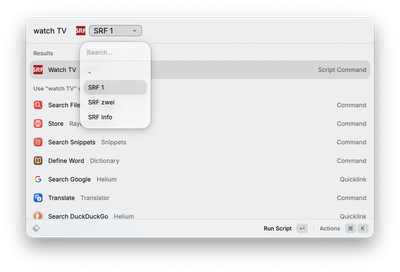
To make watching a channel easier, I wrote a little Raycast script command that launches mpv with whatever channel I pick from a dropdown:
#!/usr/bin/env bash
#
# @raycast.schemaVersion 1
# @raycast.title Watch TV
# @raycast.mode silent
# @raycast.argument1 { "type": "dropdown", "placeholder": "Channel", "data": [{"title": "SRF 1", "value": "@233.50.230.1:5000"}, {"title": "SRF zwei", "value": "@233.50.230.2:5000"}, {"title": "SRF Info", "value": "@233.50.230.3:5000"}] }

set -euo pipefail

url="http://YOUR-UDPXY-HOST:4022/udp/$1"

# Launch detached so Raycast returns immediately.
nohup /opt/homebrew/bin/mpv --force-window=immediate "$url" >/dev/null 2>&1 &
disown
Now it's launching Raycast, pick a channel, and it's playing. mpv also decodes on
Apple's media engine (hwdec=videotoolbox and vo=gpu-next in mpv.conf), so it saves battery.